What's New
The latest FastTrack features, performance improvements, and release notes for the GPS acceleration timer on iPhone and Android.
Races and events on your map (9.2.1)
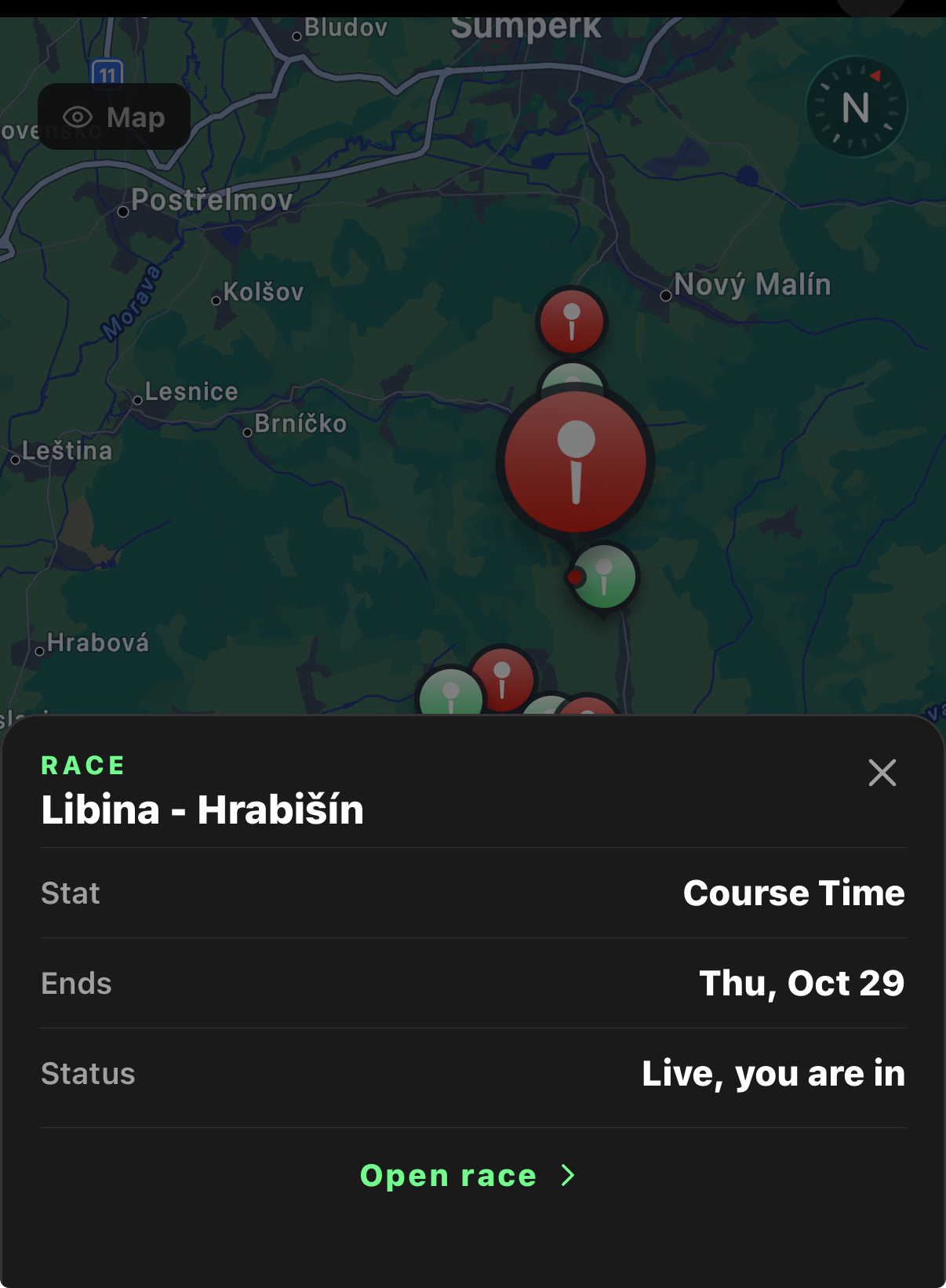
Every public race and event now pins itself on your Timer map, races can follow a street route, and you can share any race by DM or link.
- All public events and races now show up on your maps, Open the Timer and every public race and event near you is a pin on the map, in Accel, Rolling, Drive and Friends mode. Races you have joined keep their strong colour so you can spot yours at a glance. Turn public pins off any time in Settings. Open the Timer
- Tap a pin for the details, A pin opens a sheet with the stat, when it ends and where you stand. Tap Open race to go straight to it, or Counts toward to see exactly which runs and drives score. Open Races
- Routed races, A race can follow a street route. Drop a start and a finish pin, expand the course map to pick a base map and reshape the route, and everyone in the race sees the same line. Course Time races time you from the start circle to the finish circle on every drive you log. Create a race
- A race is a run or a drive, Each race tells you how it is scored. Timer stats count your valid public runs, Top Speed counts runs and drives, and Longest Drive, Total Distance and Course Time count every drive you log. Drive races get a Drive now button that opens Drive mode ready to go. Open Races
- Races tab on Explore, Races now live next to Discover, Groups and Market on the Explore tab, so you do not have to dig for them. Open Explore
- Share a race or event, Tap share on any race to send it to a friend in a DM, where it shows as a race card that opens the race, or share the link anywhere else. Links open the race in the app, or on the website with a proper preview. Open Races
- Race Control reads the race, The Race Control card now tells you what counts for this race, when the flag drops and what P1 wins, and it folds away once you are in. Drive now and Leave sit on one slim row. Open Races
- Private races by invite, Invited to a private race? It shows in your Mine list with an Invited tag. Accept to join, decline to pass, and the host can cancel a race that has not started. Open Races
- Events, with FastTrack in person, Events have a venue, a date, a cover image and a Going list. First up: FastTrack will have a tent at Super Car Week on the West Palm Beach waterfront on January 10, 2027. Tap Going so we know to look for you. See the event
- Invite a friend, get a friend, When someone joins FastTrack through your invite link they are added as your friend right away, so your friends only runs and drives show up for each other from day one. Invite friends
- Sold or totalled, A vehicle that has left your garage can be marked sold or totalled as well as retired. Its runs and records stay on your profile. Open Garage
The CarPlay cockpit (9.2.1)
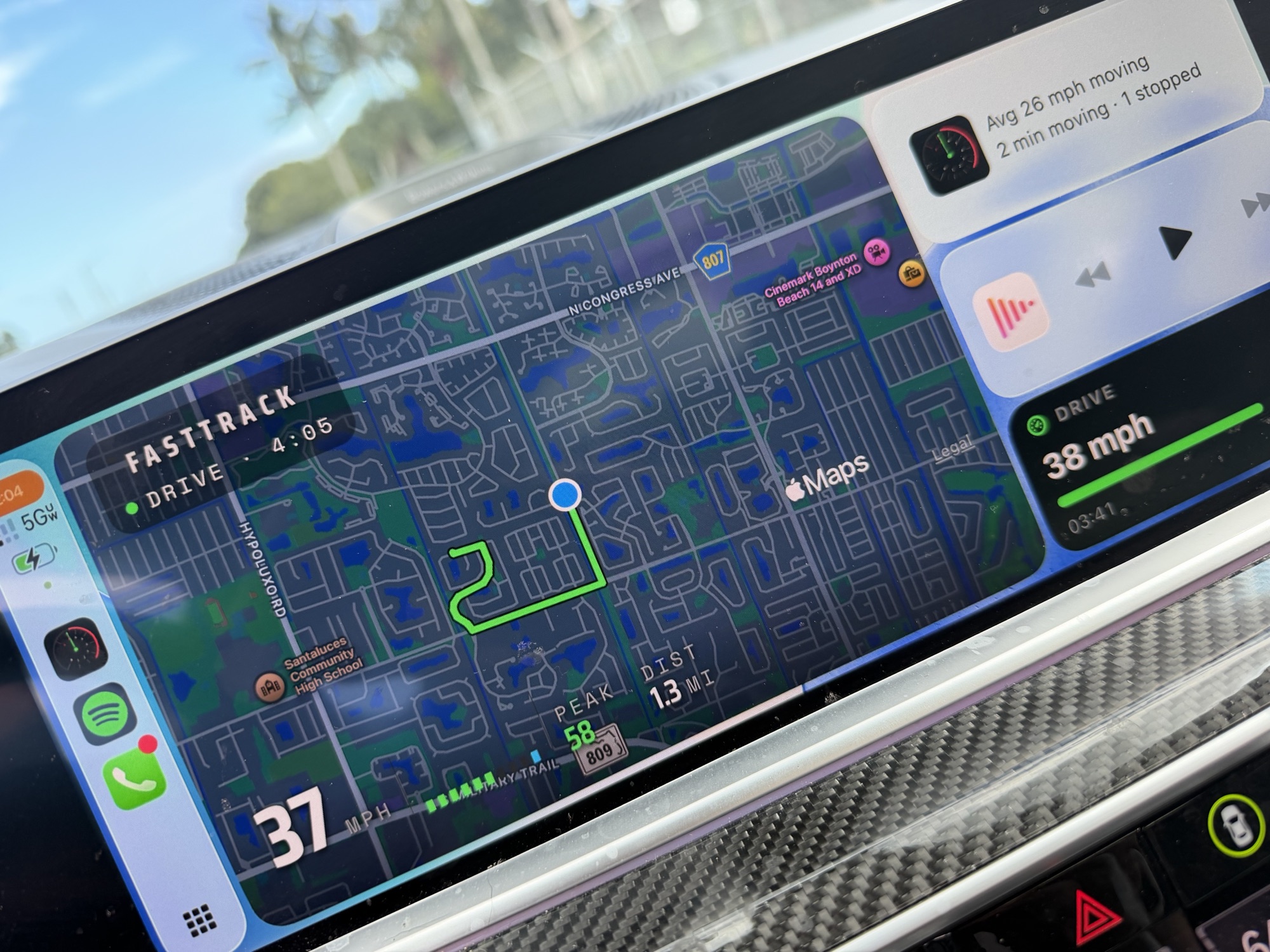
Start a drive with CarPlay and your car screen turns into a live cockpit, with pause and resume from your phone and your records chased on the dashboard.
- Your car screen is a cockpit, Start a drive with CarPlay connected and the car screen shows a live map that follows your car, with your speed, peak, distance and average on a strip across the bottom. Tap Stop on the car to pause, end and save, or keep driving. Saving shows a Drive saved card right on the car screen. Open Drive settings
- Pause and resume from your phone, A drive running on CarPlay can now be paused and resumed from the Timer on your phone, and the phone shows PAUSED while the clock holds. Pause and Stop use the same quiet style as the camera button. Open the Timer
- Chase your record on the dashboard, During a drive, the CarPlay Dashboard map pane shows your speed, peak and distance, and the card beside it chases your records: a record broken, one within reach, or your moving average against this month's best. Open Drive settings
- All your drives, on one map, The Drives tab in your Garage shows a map of every drive you have logged, opening on the area where you drive most. Tap the map to expand it, then tap any line to open that drive. The map follows your filters. Open your Garage
- Pick from overlapping drives, Where routes overlap, a short list shows each drive there with its date, vehicle, distance, top speed and duration. Tap one to open it, or zoom in to split the lines apart. Open your Garage
- Drive maps catch up on their own, A drive you just finished draws its route from your phone right away, and the Drive Log checks for any map lines filled in since you last looked. Every drive in your history now has its line. Open your Garage
- Course Time, a race over any road, A new race stat for roads with corners. Set a start pin and a finish pin and every drive in the window is timed from the start circle to the finish circle. Fastest lap wins, and laps past a minute read as minutes and seconds. Open Races
Races, redesigned and metric everywhere (9.2.0)
Races get the blueprint look and street routes between your pins, metric users see km/h everywhere, and every What's New row now opens the screen it describes.
- Races, redesigned, Official monthly races are blueprint spec cards and community races read like a timing tower. Create Race is a numbered form, and its buttons now sit above the tab bar where you can reach them. Open Races
- Street routes between your pins, Setting a course is its own screen: drop a start and a finish pin and, on iPhone, the street route between them is drawn for everyone in the race. Off road courses keep a straight line. Open Races
- Three new race stats, Races can now track Top Speed, Longest Drive and Total Distance. Top Speed counts any ride in the window: a timed run, a rolling run, a drive or a Drive with Friends session. Longest Drive and Total Distance count your drives. Highest wins. Open Races
- Metric, everywhere, With metric units on, every speed, distance and milestone label reads in km/h, km and m: garage, personal bests, leaderboards, run and drive details, trophy and exploded views, feed, messages, races and Drive with Friends. Open Settings
- Tap a What's New row to go there, Each feature in What's New now links to the screen it describes, in the app and on the website. Open What's New
- Friends can see your drive map, Open a drive, tap the camera icon and turn on Share map with friends. Friends then see your route and can replay it. The first and last 300 m are always trimmed, and everyone else still sees the drive without the map. Open your Garage
- Vehicle names stay as you typed them, VW, Chevy, GMC and friends stay exactly as you entered them. Leaderboards still group by brand, so a Chevy and a Chevrolet race on the same board. Open your Garage
- Course Time, a race over any road, A new race stat for roads with corners. Set a start pin and a finish pin and every drive in the window is timed from the start circle to the finish circle. Fastest lap wins, and laps past a minute read as minutes and seconds. Open Races
- Drive maps catch up on their own, A drive you just finished draws its route from your phone right away, and the Drive Log checks for any map lines the server has filled in since you last looked. Open your Garage
- Fixes, Opening the app from a cold start no longer flashes a signed out screen, the drive map sharing switch saves even when you flip it mid sync, and a shared drive opens on the Drive Log with the owner's car.
All your drives, on one map (9.2.0)
Every drive you have logged, on one map in your Garage. Tap a line to see that drive and open it.
- All your drives, on one map, The Drives tab in your Garage now shows a map of your drives, opening on the area where you drive most. Tap the map to expand it, then tap any line to see that drive and open it. The map follows your filters.
- Pick from overlapping drives, Where routes overlap, a short list shows each drive there with its date, vehicle, distance, top speed and duration. Tap one to open it, or zoom in to split the lines apart.
- Zoom in and switch the map, Pinch the map to zoom in place, then tap recenter to reset the view. On the expanded map, the layers button switches between light, dark, satellite and hybrid.
- See where you went, When a drive ends somewhere other than where you usually start, it is tagged with the town you drove to, on the map and in your Drives list.
- Private to you, Your drive map shows only your own drives, and only you can see it.
What's New in 9.2.0: Drive Replay, G Force & Road Conditions
Replay your drives with live g force, see the conditions for every run, and see the roads you drove.
- Replay every drive, Tap Play on any drive, or drag the slider, to step through it. Speed, grade, altitude and heading update as you go, the crosshair shows the g force in real time, and the G TRACE charts your cornering, acceleration and braking across the whole drive.
- G force and braking stats, The Drive Log now shows your peak g force, hardest acceleration, hardest braking and strongest cornering in each direction, plus your braking and cornering events, including stops from 100 mph (161 km/h).
- Weather and density altitude, Runs and drives now save the temperature, conditions, wind and density altitude at the time you drove. Density altitude is the altitude the air feels like to your engine, so you can see when the air was on your side.
- True climb and descent, Climb and descent now come from your phone's barometer instead of GPS altitude, which jumps around. Hills finally read like hills, and a flat drive reads flat.
- Know your roads, Every drive now shows the road you drove most, a curvature rating from Straight to High, the road with the highest curvature, how far you drove through real curves, and the split between highways, major roads and local roads.
- Fixes, Merged drives now show the right moving time and average speed, Explore lands where you tapped, and rental and retired vehicles sit at the end of your Vehicles row.
What's New in 9.1.1: GPS Reliability, Run Share Cards & Streaks
GPS keeps tracking through every stop, sharing a run creates a card, and your streak lives in the header.
- GPS keeps tracking when you stop, iPhone used to pause location updates after the car sat still for a while, so a session that idled at a light or staged for a run could lose its GPS lock. FastTrack now opts out of that pause, and your runs and drives record end to end.
- Share a run as a card, Sharing a run now creates a clean card with your headline numbers on it, ready for messages or social. Your posted runs look the same everywhere.
- Your streak lives in the header, The activity streak now shows as a chip in the header. Tap it to see where your streak stands and what keeps it alive.
- CarPlay drive stats hold steady, The distance on the lock-screen Live Activity no longer flickers during a CarPlay drive, and the false notice claiming a drive was not recorded is gone.
- See why a run is off the leaderboard, A Private or Friends Only run in your History now says it cannot rank on the leaderboard, and tapping the note lets you change its visibility right there.